Server and Client in email Communication
Email is something many of us use and don’t think much about. There is quite a bit of information shared in the process of sending an email. Consider that we can send an email from almost any place on Earth to almost any other place, including space. The ability to send communications quickly and easily has caused email communication to be immensely popular.

An email client is the software that a user creates an email message with, such as gmail (whatismyipaddress.com, n.d.). Once the user hits send the email message goes to an email server (whatismyipaddress.com, n.d.). The email servers know how to route the message based on the email address, the address is translated to an IP address through a DNS server (whatismyipaddress.com, n.d.). The process of sending and receiving emails involves a few different servers and networks depending on the origination and destination of the message.
Email Phishing
Based on the popularity of email communication it is no wonder that bad actors have used email for criminal pursuits. One scam that is prevalent in email is called phishing. Phishing attempts to get personal information from the victim (Sankhwar & Pandey, 2017). In a typical phishing attempt a scammer will send an email that looks like it is from a bank, credit card, or other utility (Bernard, 2018).
Phishing originally worked by flooding email address and hoping that based on the number of emails sent a few victims would reply. In this method a generic email would be sent to thousands of individuals, the contents of which asked usually asked for help with a foreign transaction. In this type of phishing scammers would relied on unsuspecting email users and hoped that perhaps one in a thousand would reply (Bernard, 2018).
As the numbers of email users have grown over the years so too has the sophistication of the email scams (Sankhwar & Pandey, 2017). Now scammers will target individuals, the scams are directed and targeted with an appearance of authenticity (Bernard, 2018). As noted by Bernard (2018), there is little risk and the possibility of high reward in these situations, so it is unlikely these activities will be stopping anytime soon.
Some Examples of criminal activity supported through email include:
1.Ransomware
Ransomware infects your computer and encrypts your files until the user pays the ransom.
2.ID Theft
Scammers will open credit accounts in the victim’s name by applying for credit with stolen information.
3.Unauthorized Access
Unauthorized access to computer systems by phishing for information.
4.Control of Machine
Putting software on a machine sent through email that will allow a scammer to control a victim’s machine for their own purposes.
Email Spoofing
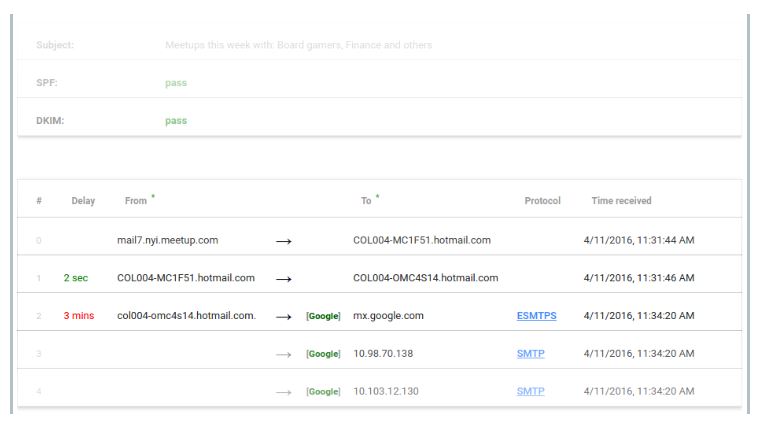
One of the more common ways for victims to fall to email scams is through spoofing. Email spoofing makes it look like an email message came from an address that it did not actually come from (Iyer, Atrey, Varshney, & Misra, 2017). Employing spoofing a scammer sill forge the email source so that it appears that the email came from a legitimate address, such as the victim’s bank (Iyer, Atrey, Varshney, & Misra, 2017). The information in the email header is different in a spoofed email than one originating from a legitimate source (Iyer, Atrey, Varshney, & Misra, 2017).
Email Headers
Below is an example of headers that can be found in a Google email message.
Laws Against Phishing and Computer Abuse
In the United States there are laws against using computer systems for criminal activities. In the state of California there is the Anti-Phishing Act of 2005 that forbids the use of email messages, web pages, and other electronic means to solicit identifying information fraudulently (State of California, 2006). Federally there is the Computer Fraud and Abuse Act which prohibits accessing computer systems without authorization (Cornell Law School, n.d.). Despite these laws the advancement of technology is too quick for the criminal justice system to keep up. Prosecutions for phishing related crimes are rare.
Simple Steps to Protect Yourself
There are some common giveaways that can alert you to a potential phishing email. The list below outlines the common red flags that should be avoided to keep your online activities safe. The following list from Bernard (2018), is not all inclusive but does cover the most common scenarios.
An unusually large amount of spelling and grammar errors
Generic web email address
Inaccurate and unusual jargon
Links that don’t go to the correct address
Asking for help with foreign financial transactions or sales
References
Bernard, N. (2018). Reasonably Suspicious: Avoiding Targeted Email Scams. Utah Bar Journal, 37-41.
Cornell Law School. (n.d.). 18 U.S. Code § 1030 – Fraud and related activity in connection with computers. Retrieved from Legal Information Institute: https://www.law.cornell.edu/uscode/text/18/1030
Iyer, R. P., Atrey, P. K., Varshney, G., & Misra, M. (2017). Email Spoofing Detection Using Volatile Memory Forensics. 2017 IEEE Conference on Communications and Network Security, 619-625.
Sankhwar, S., & Pandey, D. (2017). A Comparative Analysis of Anti-Phishing Mechanisms: Email Phishing. International Journal of Advanced Research in Computer Science, 567-574.
State of California. (2006, Jan 1). Business and Professions Code. Retrieved from California Legislative Information: http://leginfo.legislature.ca.gov/faces/codes_displayText.xhtml?lawCode=BPC&division=8.&title=&part=&chapter=33.&article
whatismyipaddress.com. (n.d.). What is a mail server. Retrieved July 31, 2018, from what is my ip address: https://whatismyipaddress.com/mail-server


